I analyze the various aspects of PC hardware for a living, so I like to assume that I’m at least somewhat shielded from products that provide no value besides aesthetics. So it feels unnatural to confess that the Instagram algorithm successfully proved otherwise. A few weeks ago, it served me Lian Li’s 8.8-inch Universal Screen, which, after a cursory glance, I ended up buying.
What sold me was something every aesthetically pleasing internal USB screen comes with, which was a sharp panel that reads out your system’s temperature sensors, keeps a log of them, and looks good doing it. For about $75, it felt like a reasonable indulgence, so I bought it explicitly for those things. What I did not expect, however, was the fact that it would turn out to be much more than it was advertised, which is indeed rare. It now runs a part of my Windows desktop, and I reach for it way more often than I expected I would.
Getting it up and running took minutes
An occupied USB header nearly stopped me, and then it did not

After it arrived, my first point of anxiety was the connectivity. The Universal Screen wanted an internal USB connection, which was something of a luxury in my borderline-cramped micro-ATX case. Lian Li clearly anticipated this, because the box happened to include an internal USB to USB-A adapter. That let me route the cable out of the back of the case and into one of the rear panel USB-A ports, most of which were unused anyway. This reduced another USB splitter purchase and a two-hour-long cable routing nightmare to two minutes.
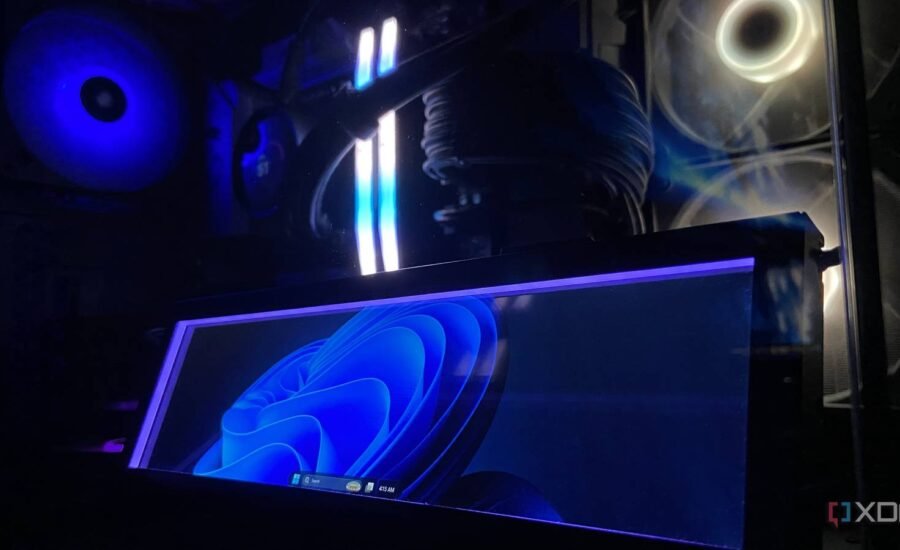
The vast majority of the time, believe it or not, went into deciding the placement. The screen is small and light enough that I could have run the cable across my desk and stood it under my monitor, which is where a lot of owners keep theirs. I went the other way and mounted it inside the case, facing out through the side panel. That’s where I prefer it because it doesn’t contest for my attention away from the main screen, and reads well from my chair anyway.
On startup, Lian Li’s L-Connect 3 software handled the rest rather perfectly. It gave me an option to switch between a broad selection of screen themes, and so the temperature dashboards I bought it for were up and running in seconds. At that point, I thought the job was done, until I decided to probe a little further.
It is a full display in its own right, and not just a temperature gauge
1920×480 at 60Hz, extended straight onto my desktop

The theme gallery is only half of what the L-Connect 3 does. Through the same software, it’s possible to hand the panel over to Windows 11 as a monitor rather than an accessory. Discovering this one setting, needless to say, completely changed how I use it. My desktop extends onto it, my cursor crosses onto it, and I can drag any windows or tabs I’m working on down there if I want to. Everything Windows knows how to do with a second monitor, it now does with a strip mounted in my case.
Since the panel runs at 1920×480 and refreshes at 60Hz, it behaves as an ultrawide strip. Windows menus, text, and controls stay sharp on it. Because of this resolution, every label and every line on the UI stays clean and readable from the distance from where I sit on my desk in spite of the display sitting inside the case behind the glass.
It runs the jobs that felt like a hassle on my main monitor
Media controls, Discord, and notifications, all without alt-tabbing
I game and work on a single OLED monitor, and that is exactly something this setup greatly enhances. Before introducing this screen to my setup, changing a track meant alt-tabbing out of whatever I was playing roughly every two and a half minutes, which dropped me out of the game and broke the immersion of the experience. Now, I can just tilt my head right, move my cursor past the edge of the monitor, and my media controls are already sat there. The game, or the browser tab I’m working on, stays right where it should be.
It’s the very same with multiplayer sessions with my friends that demand frequent use of the Discord overlay. The panel has become the de-facto control center I keep the call on, so participant lists, mute toggles (for the times someone decides to play obnoxious tracks), and channel controls stay off my primary display and out of my way. It also doubles as a notification center for everything I would otherwise tab away to check.
Now, if all of that sounds a lot like having a secondary monitor, I feel like I’ve expressed myself well, because the Lian Li Universal Screen is exactly that. It does everything you’d expect a second monitor to do in enhancing the overall desktop user experience and reducing the cognitive load on you as a user, but it does it all for a lower price and without demanding the additional HDMI port on your GPU, the cable management and monitor arms that accompany it, and the real estate on your desk.
A desktop extension that I never knew I needed

The Universal Screen by Lian Li certainly served to reveal an 8.8-inch gaping hole that was missing from my desktop experience. It’s the rare kind of product that you buy for the aesthetic appeal, only for it to surprise you with its utility later. Having used it for more than a week, it has certainly become irreplaceable for me, mostly by returning some of the desktop real estate reserved for my main programs and offloading tinier toggles and media centers that cluttered it.
At its usual $84.99 price point, it trails uncomfortably high up in hierarchy, competing with other USB-A portable monitors that could be placed on your desk which, of course, would come with a bigger display and resolution, but with a 10% discount, it certainly returns its value in sheer utility. It’s a purchase I do not regret, and likely never will.