We’ve reached the point where AI video can generate some genuinely stunning shots. Landscapes, characters, cinematic camera angles, whole scenes that would have taken a small team to put together not so long ago are appearing in seconds. But anyone who’s tried to turn those impressive clips into something resembling an actual film has probably run into the same problem: it’s much easier to get AI to create something short and simple than it is to direct something long-form and meaningful.
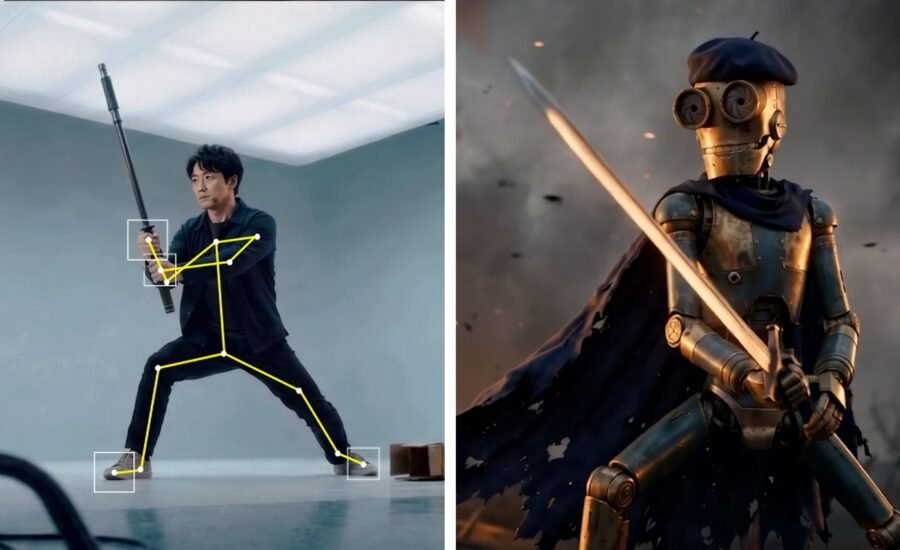
That’s the problem Autodesk is trying to solve with the latest expansion of Autodesk Flow Studio, which it now describes as an AI-native creative platform rather than simply another generative AI tool. Instead of asking you to describe everything in a prompt and hoping the model fills in the gaps, the new 3D Editor + Canvas workflow first puts cameras, characters, animation, environments and AI motion-capture data into a proper 3D workspace, leaving AI to generate and refine the finished visuals.
Ironically, Autodesk’s answer to AI isn’t more AI. Instead, it’s putting creators back into a production workflow they’ll already recognise. “Because filmmaking has always been directed in 3D, even though most generative AI video workflows have tried to control it through 2D inputs,” says Nikola Todorovic, co-founder of Wonder Dynamics, an Autodesk company. “In the real world, a director works spatially. You direct an actor where to move, where to look, how quickly to perform an action, and how they relate to the camera and the environment. You place the camera, shape its movement, adjust the framing, and refine the timing. These are all decisions made in three-dimensional space.”

With 3D Editor, creators can block scenes, direct performances, and control timing, pacing, and camera movement before moving into Canvas to generate, refine, and shape the final look in 2D. “With 3D Editor, creators can make those filmmaking decisions explicitly and refine them with precision before generating the final image,” Todorovic says.
Canvas itself serves as a familiar node-based editor, allowing creators to experiment with AI image and video models after the scene has been assembled, effectively separating direction from rendering. Autodesk says creators can stay entirely in the faster 2D workflow if that’s all they need, or move into 3D when they want more precise control over composition, cameras and scene construction.
“The goal is to give creators flexibility,” says Todorovic. “They can stay in 2D when they want speed and simplicity or move into 3D when a shot requires more precise direction.”

(Image credit: Autodesk)


After watching the demo (below), it’s hard to argue with where Autodesk is taking its AI platform. Rather than another parade of prompts magically becoming videos, Todorovic started with footage of someone walking. Flow Studio extracted the performance, converted it into animation and applied it to a robot created in Wonder 3D, while also lifting the camera movement from the original clip. The result means you’re no longer looking at a single AI-generated sequence; you’re looking at a performance, a camera move and a character that can all be reused independently. As Todorovic joked during the demo, the result was “this little sad bot just wandering into the void, questioning his existence.”
From there, the robot was dropped into a city generated by World Labs Marble. Then the city became a sci-fi landscape. Then an alleyway. The animation never changed. Neither did the camera. Only the world around the character did, and that’s where this starts feeling like an actual production workflow. You’re no longer throwing prompts at a model and hoping for the best; you’re making creative decisions about individual parts of a scene, much as you would in Maya or Blender.
The demo even flipped the process around, starting with an environment rather than a character. Todorovic wandered through a generated garage, found a camera angle he liked, built the shot first and only then dropped a character into the scene. It’s a small detail, but it says a lot about where Autodesk thinks AI filmmaking is heading, with prompts becoming less important than scene direction.
That shift also reflects Autodesk’s view that traditional production skills won’t disappear in an AI workflow. “I don’t think 3D skills become mandatory, but I do think they become more valuable,” says Todorovic. “The goal is to give creators flexibility. They can stay in 2D when they want speed and simplicity or move into 3D when they need more precise direction. For people who already understand 3D space, skills such as camera blocking, staging, composition, and animation can now have an even greater creative payoff.”
For the last couple of years, AI companies have been competing on who can generate the prettiest image or the most convincing five-second clip, but those demos often fall apart the moment you want to direct something specific. As Todorovic puts it, “We get quickly to 80% completion of the shot, but getting control in the last 20%, especially around iteration, is where these 2D-only approaches break.”
Autodesk is instead betting that the next stage isn’t better generation; it’s better control, and that’s a far more interesting idea because it puts composition, cinematography, staging and animation back at the centre of the creative process rather than asking AI to make every decision. I’ve spoken to a number of filmmakers in the last year who have been experimenting with AI, including Kavan Cardoza and Kévin Mendiboure, and they say the same thing: AI is a tool, but you still need knowledge of film techniques and editing to make anything meaningful.
Autodesk says the new workflow is aimed at everyone from independent filmmakers and artists to studios, marketers and storytellers looking to build more complex productions. That accessibility is intentional. “One of the biggest opportunities is for independent filmmakers and small creative teams to take on work that previously required a much larger production infrastructure,” says Todorovic. “A single artist or small team can now explore, iterate, and execute at a scale that would previously have been difficult to reach.”
Autodesk also says that deeper Maya integration, broader asset import, AI-assisted scene construction, and agent-driven directing workflows are all on the roadmap.
The bigger lesson is already here, though. Autodesk’s argument isn’t that prompts disappear, but that they stop being the centre of the creative process. Instead, 3D becomes the place where filmmakers make decisions, where foundational knowledge informs those decisions, and where AI becomes the technology that renders them. “We’re moving from AI as an asset and video generator toward AI as a genuine creative assistant,” says Todorovic. “The most useful AI will not replace creative decision-making; it will make those decisions faster to explore and easier to realise.”
If that’s where generative filmmaking is heading, it’s a much more interesting future than simply ‘getting good’ at typing prompts.

(Image credit: Autodesk)


Visit Flow Studio for more information.